
Blender 教學:為球體加入 Armature(骨架),建立父子關係並加上約束(constraint),準備製作動畫。
Step 1:加入球體 #
做法: Shift-A → UV Sphere
Step 2:把球體移到地面 #
做法: 選取球體 → G → Z → 1
Step 3:套用棋盤格紋理 #
做法: Material Properties → [New material] → Base color(黃色圓點)→ Checker texture


Step 4:預覽紋理 #
做法: 右上角 → Viewport shading

Step 5:加入 Armature(骨架) #
做法: Shift-A → Armature →(viewport 仍未顯示)
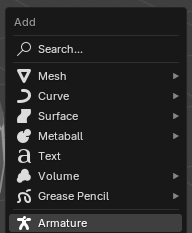
Step 6:確認 Armature 已加入 #
做法: 查看 outliner(右上方面板)→(viewport 仍未顯示)
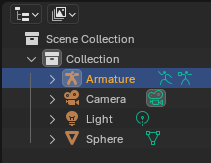
Step 7:把 Armature 顯示在前景 #
做法: Object properties → Viewport Display → In front

Step 8:縮放 Armature 至與球體同高 #
做法: 選取 Armature → Object properties → Transform → Scale Z → 2

Step 9:把球體與 Armature 建立父子關係 #
做法: 框選球體與 Armature(不要用 shift 選取)→ Ctrl-P → With Automatic Weights

Step 10:確認父子關係已完成 #
做法: Outliner →(需點開 Armature 箭頭先見到 sphere)

Step 11:為 Armature 加入約束 #
做法: 只選取 Armature → Constraint → Add Object Constraint → Maintain Volume → Free Axis → Z

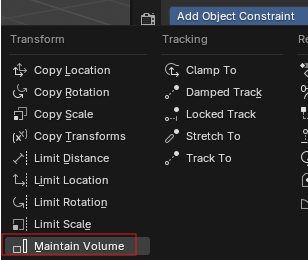
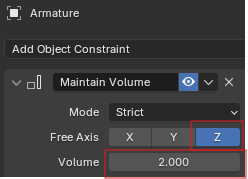
Demo 示範: https://youtu.be/RlBENZFSMDo