
This guide shows how to add custom rules to ShadowRocket’s config file so that only specified domains (OpenAI, ChatGPT, Claude, etc.) go through your IPRoyal proxy node, while all other traffic stays direct. Two methods are covered below.
Method 1 — Edit the config file directly #
- From the bottom menu, tap HOME to open the server list. Tap the letter “i” on the right to edit the server info.
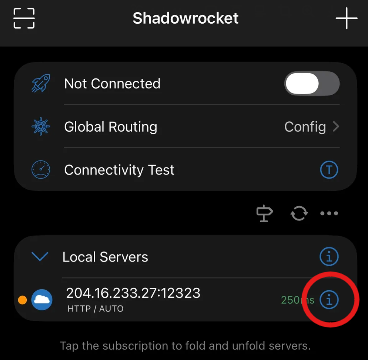
- Enter a name in the Remarks field, then tap “Save” at the top right.

- You can see the Remarks text is now shown as the server name.

- From the bottom menu, tap Config. Tap the letter “i” next to default.conf to edit it.
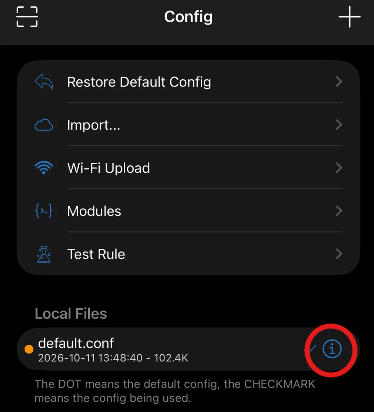
- Tap “Edit Plain Text”.

- Scroll down to find [Rule] and paste the following text under it. Rule priority is based on sequence — this example covers OpenAI and Claude. Tap “Save” at the top right.

The server name at the end of each rule must match the “Remarks” field you entered earlier.
# ---------- OpenAI / ChatGPT / Codex ----------
DOMAIN-SUFFIX,openai.com,IPRoyal-US
DOMAIN-SUFFIX,chatgpt.com,IPRoyal-US
DOMAIN-SUFFIX,oaistatic.com,IPRoyal-US
DOMAIN-SUFFIX,oaiusercontent.com,IPRoyal-US
DOMAIN-SUFFIX,auth0.com,IPRoyal-US
DOMAIN-SUFFIX,identrust.com,IPRoyal-US
DOMAIN-KEYWORD,openaicom-api,IPRoyal-US

# ---------- Anthropic / Claude ----------
DOMAIN-SUFFIX,anthropic.com,IPRoyal-US
DOMAIN-SUFFIX,claude.ai,IPRoyal-US
DOMAIN-SUFFIX,claudeusercontent.com,IPRoyal-US
DOMAIN-KEYWORD,anthropic,IPRoyal-US

# ---------- Verification & Risk Control ----------
DOMAIN-SUFFIX,arkoselabs.com,IPRoyal-US
DOMAIN-SUFFIX,challenges.cloudflare.com,IPRoyal-US
DOMAIN-SUFFIX,stripe.com,IPRoyal-US
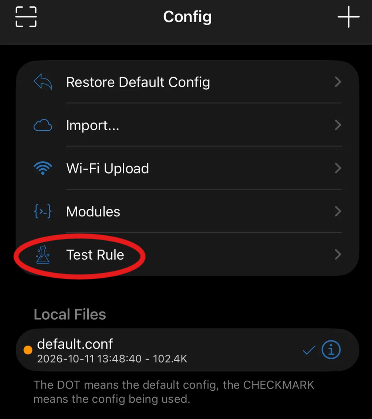
- Go back to the Config page and tap “Test Rule”.
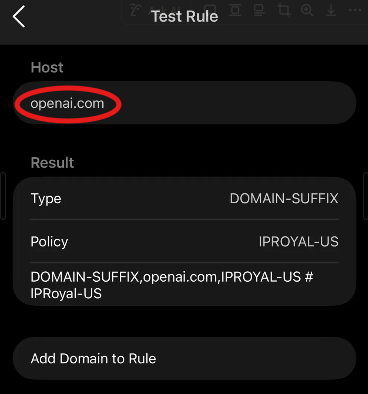
- Enter a domain that is covered by the rules and check the test result.
Method 2 — Add rules one-by-one via the GUI #
- Tap the current config file name and choose “Add Rule”.
- Set Type to DOMAIN-SUFFIX.
- Under Value, enter the domain names in order (e.g. chatgpt.com, claude.ai).
- Under Policy, select your IPRoyal node.
- Tap Save.
Post-setup checks #
- Homepage routing mode: make sure the global routing on the ShadowRocket homepage is set to Config, not Global Proxy or Direct.
- Rule priority: ShadowRocket matches rules top-to-bottom. Keep this group of AI rules BEFORE GEOIP,CN,DIRECT or the final FINAL,DIRECT (or FINAL,PROXY), so they aren’t intercepted by the general direct-connect rules.