| Item | Value |
|---|---|
| Software | Blender |
| Version | 4.2 LTS (estimated) |
| Created | August 2024 |
1. Add a cube
Purpose: Add a cube
Steps: Press Shift-A → Mesh → Cube
2. Mark the first keyframe
Purpose: Mark the first keyframe
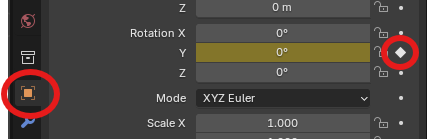
Steps: Select the cube → move the timeline to frame 1 → set a 0° keyframe for “Rotation Y”
3. Mark the second keyframe
Purpose: Mark the second keyframe
Steps: Move the timeline to frame 20 → set a 359° keyframe for “Rotation Y”

4. Select the Y rotation curve
Purpose: Select the Y rotation curve
Steps: Open the Graph Editor → click the arrow → click the Y Rotation row → click the green curve on the graph

5. Open the modifiers panel
Purpose: Open the modifiers panel
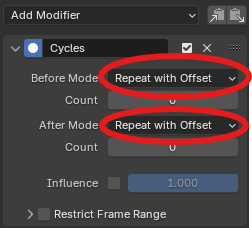
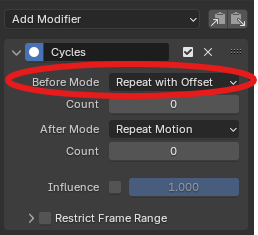
Steps: Press N → the “Modifier” panel appears on the right of the graph → Add Modifier → Cycles → choose “Repeat with offset”

6. Check if the modifier works
Purpose: Check if the modifier works
Steps: Play the animation → the cube should keep spinning
7. Add an Empty (Plain Axes)
Purpose: Add an Empty with plain axes
Steps: Press Shift-A → Empty → Plain Axes

8. Make the axes visible
Purpose: Make the axes visible
Steps: Select the axes → scale them up (or move them outside the cube)


9. Parent the axes to the cube
Purpose: Set the axes as the cube’s parent
Steps: Select the cube first → then select the axes → press Control-P


10. Animate the axes
Purpose: Animate the axes
Steps: Select the axes → set a keyframe for “Location X” at 0 m on frame 1 → set a second keyframe for “Location X” at 100 m on frame 10 → play the animation; the cube only travels a short distance
11. Open a modifier for the cube’s X location curve
Purpose: Open a modifier for the cube’s X location curve
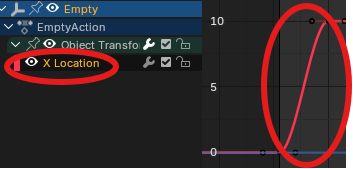
Steps: Select the axes → Graph Editor → click the arrow to show X location → click the red curve
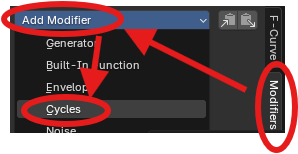
12. Add a cycle modifier
Purpose: Add a cycle modifier
Steps: On the right of the Graph Editor → Modifiers → Add Modifier → Cycles
13. Set the cycle options
Purpose: Set the cycle options
Steps: Enable “Repeat with offset” → play the animation → the cube keeps moving forward